Why I might be done buying consoles

I have owned every system from every major manufacturer for over thirty years. Even before that, I always had at least one console from each generation. Between physical collections, digital purchases and bundles, I own literally thousands upon thousands of games across those machines.

The slightly ridiculous part is that many of them remain unplayed. Like most people, I have had a job for the majority of that time and, for the last decade, I have also been a dad. The time available to actually play games has never matched the number of games I have collected.

Despite that, I have always enjoyed owning the hardware. I love new tech! And each console generation brought something new. New ideas, new controllers, new ways to play and new experiences that made owning multiple platforms worthwhile.

But over the last few years, and especially over the last few months, I have started questioning whether that still makes sense.

With the direction Sony and Microsoft have taken, I am no longer convinced that buying every new generation of console is the obvious choice it once was.

Does it really make sense to spend as much on a games machine as you would on a decent gaming PC while getting fewer of the advantages?

Ownership that isn’t ownership

A console used to represent simplicity.

You bought the hardware, bought a game, put the disc or cartridge in and played. You could lend it to a friend, sell it, collect it or return to it years later. The relationship between player and product was clear.

Digital distribution has changed that relationship.

The convenience is undeniable. Games are available instantly, storage is easier and updates can fix problems that would previously have required a replacement disc. There are genuine benefits to the modern model.

The trade-off is that the ownership model has changed. When you purchase a digital game, you are purchasing a licence to access that game through a platform controlled by someone else.

That access depends on several things continuing to work: the company maintaining the service, the storefront remaining available, your account remaining accessible and the platform continuing to support the hardware.

The industry has already shown that digital libraries are not permanent in the same way physical collections are.

Sony announced plans in 2021 to close the PlayStation 3, PSP and Vita digital storefronts before reversing the decision for PS3 and Vita following significant customer backlash. Nintendo eventually closed the Wii Shop Channel and later the 3DS and Wii U eShops, removing the ability to purchase many digital titles. Microsoft closed the Xbox 360 Marketplace in 2024, ending digital purchases for that platform.

Each decision had a business justification. Older platforms become more expensive to maintain. Security updates cost money. Licensing agreements expire. Companies have to make commercial decisions.

The problem is that those decisions directly affect the people who invested in those ecosystems.

A physical collection can outlive the company that created it. A digital collection depends on the company continuing to provide access.

That difference matters.

Servers as a Sword of Damocles

The increasing requirement for online connectivity creates another problem.

Many modern games are effectively tied to servers, even when the game itself appears to be something that should work offline. Once those servers disappear, the experience can disappear with them.

The shutdown of Ubisoft’s The Crew servers in 2024 highlighted this issue. The game required a permanent online connection, meaning that when Ubisoft ended support, players could no longer access the game they had purchased.

The hardware still worked, the game files still existed and the purchase had already been made. The service required to make the game function was simply gone.

This was one of the examples that helped drive the “Stop Killing Games” campaign, which argues that publishers should consider what happens to games when commercial support ends.

This is becoming a wider preservation issue. Gaming history is increasingly dependent on companies whose primary responsibility is running profitable businesses. Preservation matters to players, historians and communities, but it is rarely the main priority for publishers.

That creates a tension between the commercial life of a game and its cultural life.

A company may see an old game as an obsolete product. Players may see it as something they bought, enjoyed and want to preserve.

Trusting companies with your entire library

There is also the question of trust.

Building a digital library worth thousands of pounds means placing a huge amount of confidence in a single account and ecosystem.

Sony’s 2011 PlayStation Network breach exposed the personal information of approximately 77 million accounts, forced the service offline for weeks and remains one of the largest security incidents in gaming history.

Account security has improved since then, but the underlying concern remains. A lifetime of purchases is tied to systems controlled by someone else.

A physical collection has weaknesses. Discs scratch. Batteries fail. Hardware eventually breaks.

However, the ownership model is fundamentally different. A cartridge or disc does not require permission from a server before it can be used.

Digital libraries provide convenience and accessibility. They also create dependence.

PC: The long-term platform

PC gaming has quietly become the strongest option for long-term access and preservation.

It offers backwards compatibility stretching back decades, hardware flexibility, open distribution options and a community that frequently keeps old games alive long after official support ends.

When multiplayer servers disappear, communities often create replacements. When compatibility breaks, players create patches and fixes. When publishers move on, enthusiasts frequently keep games available.

That culture of preservation is one of PC gaming’s biggest strengths.

The gap between console and PC has also narrowed considerably. Modern consoles require large downloads, mandatory updates, installations and regular patches. Many games depend heavily on online services, even when they are marketed as standalone experiences.

The old idea of simply buying a game, putting it in the machine and owning the complete experience has become much less common.

A modern console is increasingly similar to a locked-down PC, but with fewer options for upgrading, modifying and preserving the software you buy.

The platform question is changing

For decades, owning multiple consoles made sense because each platform offered something different.

Sony had its franchises. Microsoft had its ecosystem. Nintendo had its unique approach to games and hardware.

That balance is changing, but not equally across all manufacturers.

Nintendo remains the strongest argument for owning dedicated hardware. Its games are built around its own systems, and its first-party franchises continue to provide experiences that are difficult to replicate elsewhere.

The Switch demonstrated that a console can still succeed because of its identity rather than simply being the cheapest place to play third-party games.

Nintendo also continues to maintain a stronger relationship with physical ownership. Most major releases are still available on physical media, allowing players to build collections that are not entirely dependent on a digital storefront remaining active.

The question is how long that approach will continue.

The wider industry is moving towards digital distribution, subscriptions and platform-controlled ecosystems. Nintendo has resisted that trend more than Sony and Microsoft, but it operates in the same industry and faces the same commercial pressures.

For Sony and Microsoft, the calculation is different.

Sony’s decision to release many of its major first-party games on PC weakened one of the traditional reasons for buying PlayStation hardware. The games are still valuable, but the question becomes whether delayed access to those titles is enough to justify the cost of the platform.

Microsoft moved even further towards a broader ecosystem strategy, making many Xbox games available beyond Xbox hardware. If the company now places more emphasis on exclusives again, it suggests that it recognises hardware still needs a compelling reason to exist.

That leads to the key question: are the exclusives enough?

For some players, absolutely. A single franchise or a handful of exceptional games can justify owning a platform. Nintendo proves that every generation. Sony and Microsoft face a different challenge because much of their gaming experience overlaps with PC.

A capable gaming PC already provides access to most third-party games, a huge back catalogue, community support and increasingly, games that were once reasons to buy a console.

The future may not be a world without dedicated hardware. It may simply be a world where a Nintendo console alongside a PC makes more sense than owning three or four separate platforms.

Nintendo provides the unique experiences. PC provides the broadest library and strongest long-term ownership model.

Sony and Microsoft have to prove that their hardware offers enough beyond those two options to justify another generation of investment.

Sony and Microsoft are creating their own problem

The frustrating part is that this situation was avoidable.

Sony and Microsoft built these ecosystems. They encouraged players to move from physical ownership towards digital libraries, subscriptions and connected services because those models offered clear benefits for both companies and consumers.

The problem is that the balance of control has shifted heavily towards the platform owners – and that transition depended on trust.

Players needed to believe that the games they purchased would remain available. They needed confidence that their collections would survive platform changes and corporate decisions.

Every closed storefront, discontinued service and inaccessible game weakens that confidence.

The issue is not that companies need to make money. Of course they do.

The issue is that the interests of shareholders and the interests of long-term collectors are not always the same.

For a hobby built around collecting, nostalgia and preserving experiences, that is a difficult direction to accept.

Enough is enough

I already own more games than I could realistically play in a lifetime.

I have enough hardware to experience decades of gaming history without buying another console. I have entire generations of machines and thousands of games waiting for me.

If a new release genuinely interests me, there is a good chance it will either come to PC or eventually arrive there.

I can see a future where my gaming setup is not every console from every manufacturer, but a PC combined with Nintendo hardware.

The PC provides access to the wider gaming ecosystem, long-term compatibility and preservation. Nintendo provides the unique experiences that still justify dedicated hardware.

That leaves Sony and Microsoft with the hardest question to answer: why should someone invest in another expensive closed ecosystem when so much of what they offer is already available elsewhere, with fewer compromises?

The next generation of consoles may be more powerful than ever. They may have incredible games. They may still sell millions of units. But power alone is no longer enough.

For players who value ownership, preservation and long-term access to their collections, the decision is becoming much harder.

After more than thirty years of buying consoles, I think this may finally be the generation where I stop.

How to fix BitLocker recovery screen issue when dual-booting Windows and Linux

I recently transitioned from an MSI G75 Titan gaming laptop (equipped with Core i9 and 1080 GTX) to an ROG Strix Scar 17, boasting a Ryzen 9 with a 3080 RTX. While the Titan remains powerful, especially after enhancing it with 6TBs of SSD and 64GB RAM, I opted to transform it into a dual-boot system, combining Windows for gaming and Linux for productivity.

Here’s a step-by-step guide to my experience, the challenges I encountered, and how I resolved the persistent BitLocker recovery screen problem when switching between the operating systems.

Setting up the dual-boot system:

  1. I retained the existing Windows OS on the Titan.
  2. I installed Linux on another SSD, with Grub as the default bootloader.
  3. To avoid potential complications, I disabled BitLocker on Windows prior to the Linux installation and re-enabled it afterward.

Encountering the BitLocker challenge:

Upon launching Windows after installing Linux, I was confronted by the BitLocker recovery screen. Various attempts to rectify this, from disabling secure boot to adjusting SSD boot priorities, proved futile.

Exploring solutions online:

Online tech communities offered a plethora of potential fixes. One widely acknowledged solution recommended suspending BitLocker management on Windows. While it worked temporarily, it was a short-lived success.

The workaround:

An accidental discovery led to a temporary fix: bypassing Grub by pressing the Escape key and typing “exit”, which would then activate the Windows bootloader. Though effective, it was hardly an efficient long-term solution.

The permanent fix: modifying Grub config

  1. Install Grub Customizer from Ubuntu Software.
  2. Open it and select the Windows entry and select the Modify option.
  3. Simply enter exit 0 above the rest of the code.
  4. At this point you can also do some housekeeping. I changed the needlessly long title to just “Windows” and I moved it to just below “Ubuntu”, above the debugging options. You may want to refactor out the pointless conditonal as well but I didn’t bother as this code will no longer be executed anyway.
  5. Hit save.
exit 0

insmod part_gpt
insmod fat
if [ x$feature_platform_search_hint = xy ]; then
  search --no-floppy --fs-uuid --set=root 20CE-363B
else
  search --no-floppy --fs-uuid --set=root 20CE-363B
fi
chainloader /efi/Microsoft/Boot/bootmgfw.efi

As an aside, I have no idea why there’s a conditional in here that just ends up running the exact same code in either case. It doesn’t inspire a whole lot of confidence in the rest of the code but I digress.

Anyway, after these steps, switching to Windows from Grub should consistently boot without the BitLocker recovery screen popping up.

The ultimate Sony PSP Go

Sony released the original PSP back in 2005. It was promoted as a portable PS2 but although it was impressively powerful for the time, as was standard practice back then, Sony was talking bollocks and in reality its power lay somewhere between that and a PS1.

Its games came on a Universal Media Disc or UMD. This was a 1.8GB disc encased in a plastic housing that was designed to protect the media from scratches.

UMDs were chosen over cartridges because of their capacity and, more importantly, their cost-per-GB. To compare, cartridges for Nintendo’s DS ranged between 8 and 512MB in capacity – with most games using either 64MB or 128MB.

In truth though, the format sucked. The PSP’s drives were painfully slow, clunky and overly fragile for a console that was meant to be portable. And thanks to the mechanical aspect of the drive, it also impacted on the battery performance of the console.

Sony released two more iterations of this design which improved the performance and specification of the console, but they were all hamstrung by the UMD drive.

In 2009, Sony released the PSP Go. This model removed the UMD drive and the idea was that users would get their games from the online store instead. The removal of the drive meant that the console could be much smaller and lighter than all the other iterations, with better battery life.

Where Sony gave with one hand though, it took away with the other. The memory format was changed from the Pro Duo of the earlier models to another proprietary format called M2, which was much smaller – about the same size as Micro SD. This decision would be significant for the model’s future.

After releasing a console that could only get its games from the online store, Sony seemed determined to make it as difficult and as unpalatable as possible for people to actually go ahead and make use of it:

  1. The digital versions of games were more expensive than their physical counterparts. They would also remain full price for months if not years after release, while physical copies would get discounts just weeks later.
  2. Since digital seemed to be an afterthought as far as the PSP was concerned, the vast majority of the PSP’s game library was not available for digital purchase due to licensing issues.
  3. The M2 memory cards required to store these downloaded games were stupidly expensive compared to alternatives like Micro SD, and while Micro SD capacities continued to increase, the largest M2 that was ever released was just 16GB. This meant users with large collections of digital games would either need to purchase multiple cards – each stupidly expensive – and swap between them as required, or just have the one card with a small selection of games carefully chosen from their online library.
  4. Although Sony had previously suggested PSP owners with existing UMD collections may be able to trade these in for digital versions at “participating stores”, this idea never came to pass. So regardless of the size of a user’s UMD collection from earlier PSP models, it was actually impossible for Go owners to play those games on the Go without re-purchasing them digitally – for inflated prices – and that was only if they were even available for purchase.

It’s little wonder then that commercially, the Go was a failure.

The hacking scene however turned the Go into a pretty reasonable device, since custom firmware allowed it to run games that the user could either dump themselves using a UMD-based console, or take advantage of someone else’s efforts and download them for free from the internet.

Suddenly the Go wasn’t limited to the anaemic selection of games that Sony had made available on its store, and it could play every game that had been released physically. This really made up for Sony’s poor efforts.

This development benefitted the other PSPs too, since they no longer had to use their slow, clunky and battery-sapping UMD drives to play games but instead could run them all from memory card. However, while those consoles enjoyed ever-expanding Pro Duo capacities, the Go languished on 16GB (or 32GB including the internal memory) and this was because the Go’s lack of sales convinced them not to bother releasing any larger capacities.

The older PSPs have even able to enjoy the much larger capacities of modern Micro SD cards thanks to Pro Duo/Micro SD card adaptors. But since M2 is about the same size as Micro SD, it has not been possible to create an adaptor for those.

The PSP Go is actually my favourite form factor as it fits very comfortably in even the smallest of pockets, and since the screen is a little smaller than it is on the others it also looks a little sharper. It can also be played on a large TV thanks to TV-out and Bluetooth support that allows it to be paired with a controller. For years though, the problem with the Go has been its terribly small memory limitations. But not any more!

Breaking free from M2

I recently purchased this ribbon cable from a seller in Japan. It allows the use of a Pro Duo/Micro SD adaptor by running a cable from an internally-stored adaptor to the M2 port.

It took about a week to arrive. I’ve just installed it and am pleased to report that my Go now has access to the 16GB internal memory in addition to… a 400GB Micro SD card! So I now have the most portable iteration of the PSP with almost half a terabyte of storage space – and it can even be upgraded with a larger Micro SD card in future as capacities continue to increase!

Similar mods have been available in the past but those have required irreversible modifications to the device, which I was never keen to do. This modification however is completely reversible as it has caused zero harm to the console.

My next problem is deciding on how to fill that card!

Why Nintendo sucks at hardware

In general, I’m a fan of Nintendo: their hardware possesses a playfulness that is absent in their competitors and their games are almost always polished to within an inch of their life.

But Nintendo does seem to make a lot of really stupid mistakes with their hardware: mistakes that often make me wonder what their product designers – not to mention QA teams – are smoking sometimes.

I’m not talking about cosmetic preferences here – purple consoles aren’t to everyone’s taste but that doesn’t constitute a design flaw. Nor am I talking about the incompatibilities between the not-so-hidden agenda of decision makers and the needs of the customer – like proprietary connectors or memory cards – because although these things are annoying, they’re still deliberate if disagreeable decisions and not stupid oversights.

What I’m talking about here are instances where the entire product development process has failed to such a degree that hardware is released with glaring deficiencies that affects the core functionality of said product.

Nintendo 3DS

The Nintendo 3DS brought spectacles-free 3D to the masses. But across its many iterations it also contained three significantly stupid design flaws.

Firstly, it only came with a single analogue stick. The release of the hideous 2nd analogue stick add-on accessory mere months later confirms that this was a stupid design flaw.

Later revisions of the console had a 2nd stick built-in, though for some reason it was a tiny nipple-like nub and not the true 2nd analogue stick that everyone was expecting and hoping for. Perhaps Nintendo felt that not calling it a 2nd analogue stick somehow excused them for not including it in the original release of the console?

Secondly, in the case of the “new” (read: redesigned) 3DS consoles, the user had to use a screwdriver to remove a cover in order to replace the micro SD card. Although it’s unlikely that a user was going to need to replace this card too often, they most probably wanted to replace the card at least once with a higher capacity example given that the console shipped with just 8GB. Needing a screwdriver to achieve this when I think every other device of this kind in the world allows access without such a tool (as did the original 3DS as well as the later 2DS XL) is just ridiculous.

But a far more serious design flaw that came with the original iteration of the console – one that wasn’t limited to hampering gameplay or causing an inconvenience but actually physically damaging the console through no fault of the owner – was the design of the clamshell.

Closing the screens – as you would do when not using the console – would slowly accumilate scratches on the top screen because it actually came into contact with the bottom half of the console. Later revisions would add little rubber spacers to prevent this from happening, but not before many owners of the original console got to ruin their machines just from using it the way they were supposed to. How was this issue not picked up during development?

Nintendo Switch

Nintendo clearly didn’t learn from their mistakes with the 3DS though, because the screen on the 3DS’s successor, the Switch, is also damaged when using the console as intended.

The Nintendo Switch is a handheld console that comes with a dock that allows the user to quickly and easily connect the console to their TV. This mechanism allows the gamer to enjoy their games both on the big screen and while on the move.

But sliding the Switch in and out of its dock causes scratches on the console’s screen where the (plastic) screen cover meets the (also plastic) guides of the dock.

Had Nintendo spent a little more and used toughened glass screen covers or alternatively softer (maybe velvet-covered?) guides, then this would not have been an issue. As it was, users were left to come up with their own solutions which often consisted of toughened glass screen overlays, filing down the guides, gluing home-made velvet covers over them, a combination of all three or simply purchasing a third-party dock (and hope it didn’t brick the console).

Then there’s the joycons – the Switch’s controllers. For the first few months after release, it was obvious from the many forum posts and news stories that these weren’t quite right either, with many of them failing to register input on the device. Nintendo issued statements suggesting that users must be sitting too far away from their console or that their wifi was causing interference, but there are many videos online of users demonstrating the issue while holding the controllers literally inches away from the console. Bear in mind that this is something that is supposed to work from at least the distance between the sofa and the TV. Nintendo later claimed to have fixed the issue with a firmware update (so it wasn’t wifi interference then?) although many users still complained about the issue.

Then there’s the kickstand. This is a flap at the back of the console that when extended props up the console so that it can be played while resting on a flat surface. Nintendo calls this “tabletop mode”. The kickstand is very thin, very flimsy, and placed so far over to one side of the console that the lightest of taps with your finger on the opposite side is enough to topple it over. This kickstand should obviously have been made from sturdier material and should have been placed more centrally.

While we’re on the subject of “tabletop mode”, while you’re using the console like this, it’s actually impossible to charge the device because the charge socket sits on the bottom edge of the console – the edge that is now in direct contact with the table.

So you either have to quit playing after a short time to charge up your console or prop it up on the table using a 3rd party stand – or if you don’t want to fork out for one of these, some home-made solution.

Nintendo finally released their own charging stand on the 13th of July 2018 – a whole 15 months after the console was launched. But the charge socket should obviously have been placed elsewhere.

Usability testing? What’s that?

It’s my opinion that Nintendo makes more than enough money to put their products through some decent usability testing before launch. Have people actually use their products for a month or two and then provode feedback on their day-to-day experiences with the hardware.

I think this would help them to release products that aren’t fundamentally broken in terms of their design and that can only be a good thing both for Nintendo and for their customers.

The ultimate Sega Dreamcast

Having recently secured a dedicated games room after moving house, I’ve been slowly working my way through each retro console and making it the best that it can be before adding it to my custom-made TV cabinet. First on the list was the Sega Dreamcast.

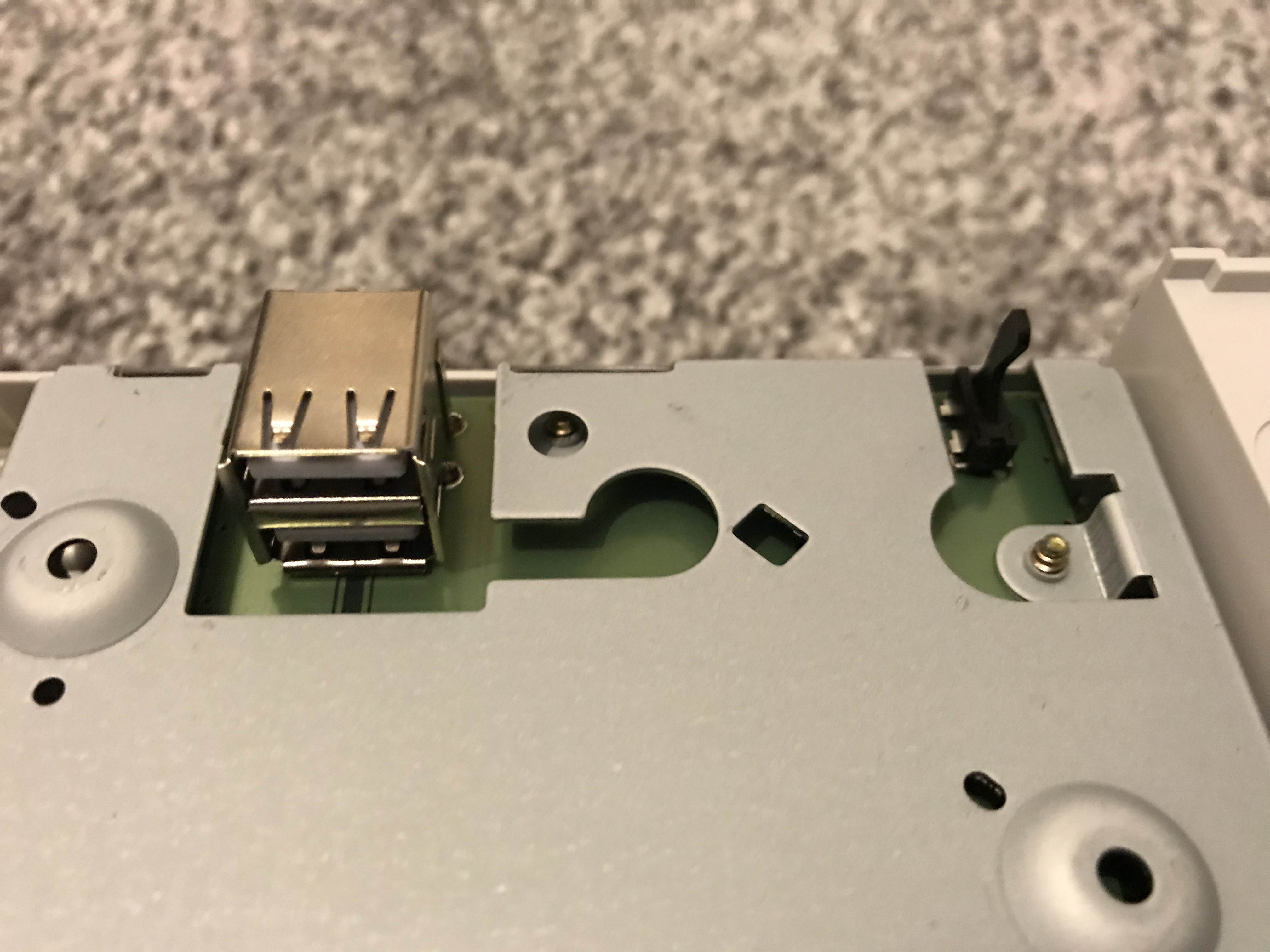
The first thing to do was replace the optical drive (inherently one of the parts most prone to failure on retro hardware) with a USB GD-ROM. This board physically replaces the drive with a USB port allowing the user to run their games from USB stick. Games load faster, the console is more reliable (and a lot quieter!), and depending on the size of the USB stick, the owner need never get up from the sofa again when switching games!

When researching this component I come across a fair amount of negative feedback on “Mnemo”, the guy who makes them, including the notice on this page (since removed so check out this page instead).

By all accounts, the guy seems to be a bit of an arsehole challenge to work with. Nevertheless, the USB GD-ROM is a great piece of kit, he seems to be the only person on this earth who makes them and they hardly ever seem to come up for sale second hand, so if I wanted one I was going to have to buy direct from this guy.

Thankfully I found feedback from many users who had done just that and they had all received their units as promised so I took the plunge. And I’m pleased to report that a few weeks later, it arrived!

For a lot of people, this is as far as Dreamcast modding goes. But I didn’t like the fact that the board was visible through the hole inside the drive bay where the optical drive had once sat, so I ordered a 3D-printed plate that hides everything very neatly.

Patriot 512GB Supersonic Mega USB 3.0 drive completed the mod, allowing for the majority of the Dreamcast library – and certainly every 70%-and-over game – to be accessible without ever having to open the drive bay again.

Since the USB GD-ROM requires far less power than the optical drive, the power supply is known to get quite hot after this mod. Some people get around this by adding a resistor which is intended to dissipate some of that leftover power, but this didn’t strike me as a particularly elegant solution.

I subsequently found an Indiegogo campaign for the DreamPSU which replaces the original PSU with something far more suitable. I backed it and subsequently received two units. The DreamPSU keeps the console nice and cool and, since the original PSU is the 2nd most likely component to fail due to age, it should also last a lot longer!

Another benefit of the USB GD-ROM is the complete removal of the noise created by that optical drive. As such, my Dreamcast was now much quieter than an original specification machine but thanks to that incredibly noisy fan on the side, it still wasn’t truly quiet.

I remedied this by installing a Noctua NF-A4X10-FLX 5V fan with the Dreamcast Noctua fan mod kit. The result is that the console is now almost completely silent when running.

Another annoyance that I wanted to overcome was the dead internal battery. These units are meant to be rechargeable but after 20 years a lot of them have lost the ability to hold a charge. The result is needing to set the internal date and time every time the console is turned on.

Unfortunately the batteries are soldered to the board and cannot be easily replaced, but thankfully there is a solution which is to remove this component entirely and replace it with a battery holder that does allow the battery to be easily replaced.

Update 2nd July 2019

As of now, my Dreamcast also has a DCHDMI installed.

I had previously been using a VGA cable with an OSSC, with phono cables running into the speakers under my TV. The image quality this setup provided was excellent, and until DCHDMI came out, was the best available.

However, the clarity provided by DCHDMI is a noticeable improvement even over the above setup, and the bonus is that I no longer have to setup the OSSC and I no longer have to run phono cables to the speakers. It’s just a single HDMI cable running from the console into the TV, which itself runs through those same speakers by default. And the image quality is amazing!

The Results

So my Dreamcast can now play every game worth playing at the click of a button and it can load those games faster than it ever could before. It’s super quiet, easy to maintain and future-proofed for the next 20 years.

I’m very happy with how it’s turned out!

The fundamentals of writing a framework

In software engineering, a framework is an abstraction in which software that provides generic functionality can be modified by implementation-specific code in order to result in application-specific software.

So SOLID

A good framework adheres to the SOLID principles of object-oriented design. These principles are:

  1. Single responsibility principle. A class should do just one thing (and do it well).
  2. Open/close principle. A class should be open for extension but be closed for modification.
  3. Liskov substitution principle. Objects in a program should be replaceable with instances of their subtypes without breaking the application. See: polymorphism.
  4. Interface segregation principle. Many client-specific interfaces are better than fewer general-purpose interfaces.
  5. Dependency inversion principle. Depend upon abstractions, not concretions. See: interfaces or protocols.

These principles are mostly self-explanatory, though I think the open/close one is a little more ambiguous in that deciding to which degree a class should be open or closed is often a matter of circumstance and of opinion.

Personally, when dealing with the access modifiers such as private, protected, internal or public (which may be named differently or which may not even exist at all depending on the language in question), I make very few methods and properties private to the class itself because it’s impossible to be certain that they won’t need to be accessible or be extended in a subclass at some point down the line. So by default I tend to use whichever access modifier makes the method or property accessible to the class that defines it as well as to its descendants – but which prevents access from outside.

Of course there are occasions when private is more appropriate. But few things are more infuriating than trying to extend a supposedly extensible framework class and discovering that a method or property that is required for this new functionality is inaccessible. Deciding between duplicating the inaccessible functionality or forcing access to it with a hack is unpleasant and shouldn’t be necessary.

One other notable point about the SOLID principles is that, in general, they are numbered according to their importance and to the impact that they will have on a codebase. That is, with every principle that is adhered to, each subsequent principle becomes increasingly easy to adhere to; similarly, if any principle is not adhered to then subsequent principles will become increasingly difficult to adhere to.

With that in mind, it is imperative to have ‘single responsibility’ at the forefront of your mind when designing your framework, because if that principle is adhered to correctly then the others almost fall into place by themselves.

When it all goes wrong

Recently I was working on a project that was based on a framework that was developed by an internal team. This framework had been extracted from a previous product which is always a tricky proposition, but if the SOLID principles above are adhered to then it is possible to extract a usable framework in this way.

However, what was painfully clear on this project was that these principles had not been adhered to at all: classes were often enormous with multiple responsibilities; they were difficult to extend with the methods and properties that would be useful to a subclass often being private; subclasses would often disregard their supertypes’ contracts; and interfaces were like gold dust with the vast majority of the framework written for concrete implementations.

On top of all that, the framework also contained lots of implementation-specific code that the framework team must have felt was so intrinsic to the company’s applications that having it written into the framework was acceptable. But in the real world where a client’s prerogative is to make unexpected (and sometimes illogical!) change requests, the result was that the application was sometimes forced to extend classes that performed unwanted work, only to have to undo that work itself immediately afterwards. Needless to say, this was wasteful.

In some cases, the framework’s classes performed so much unwanted work that – in the interest of application performance – it was actually necessary to exploit the order in which packages were loaded by the compiler to override the framework’s class with a local application version, just so that all that unnecessary work could be stripped out. And yes, this also meant that any of the framework class’ code that we wanted to maintain had to be duplicated. Why not simply substitute the class? Because as mentioned above, everything was written for concrete implementations.

Unsurprisingly, this framework felt more like a monster that had to be wrestled with than a helpful tool. The development of every new application feature was tedious, laborious, frustrating and time-consuming. But a rewrite wasn’t possible because the framework was too large and was used by too many applications.

Keep it simple

As well as adhering to the above SOLID principles, it is important to remember that the whole point of a framework is to provide an abstract foundation onto which an application developer can build their application-specific software with their implementation-specific code: a framework should therefore NEVER contain implementation-specific code itself!

This is not to say that a framework developer is prohibited from providing their application developer colleagues with functionality that is common to their company’s applications – they may indeed do so, but the correct approach is not by polluting the framework with it because that should remain abstract: instead, this common functionality should be placed in a separate package, allowing the application developer to use that functionality if they want to and not because they have to.

The 4 Good Things

The BBC’s Future Media department promotes the use of four key principles across its engineering teams, known as “The 4 Good Things”.

The interpretation of these principles tends to vary a little across each team, but generally speaking they provide a consistent approach to software development across a number of different projects, platforms and languages.

Here are those four principles along with my personal interpretations.

1. Meaningful Code Reviews

  • Code should be written in pairs whenever possible, or reviewed by someone else at the earliest opportunity when it’s not
  • Only code successfully reviewed should be merged to trunk
  • Traceability is recorded (who did the code review and who wrote the code)

2. Developer Accountability for Non-Functional Requirements

  • Operational considerations (i.e. NFRs) are part of the definition of ‘done’
  • NFRs should be discussed with stakeholders in depth
  • A feature/story isn’t complete until the team is confident that it can be managed in production and perform well under foreseeable load and circumstances
  • Developers are accountable for monitoring the health of the product

3. Real Continuous Integration

  • Smoke tests that are automatically run on each commit (and at least daily) in order to confirm that the latest commit has not fundamentally broken the build and/or the world
  • Tests must be in a shared environment so that they cover changes made by all developers, and because “it works on my machine” is not the point
  • Tests are run against trunk

4. Automated Acceptance Tests

  • NFRs are explicitly stated in the stories wherever possible to help ensure the definition of ‘done’ is met
  • Acceptance tests should include all of the functional tests
  • Acceptance tests should run on the TEST environment

The Pied Piper of JavaScript

For a couple of years now, JavaScript has been encroaching into territory traditionally held by Flash.

At the BBC’s TVMP department, news of set top boxes making the switch to JavaScript seems to be an almost daily occurrence as manufacturers fall over themselves to jump onto the JavaScript bandwagon for alleged “faster development” and the mythical “build once, deploy everywhere” utopian ideal.

I’ve witnessed the repetition of such claims myself. “We’ll be switching this product to JavaScript in the near future because – obviously – it’s faster” a product owner once said, followed by the nodding heads and murmurs of agreement of other non-developers.

The reality for those of us who have not succumbed to the merry tune of the JavaScript Pied Piper’s flute is that “build once, deploy everywhere” is nonsense as far as JavaScript is concerned and the platform simply isn’t mature enough to competently support apps like this without extensive – and in terms of time, expensive – hacks and workarounds.

Time is being spent filling the gaps of missing libraries and frameworks by converting codebases from other languages – including Flash.

The Flash version of the Sports app that delivered the Olympics last year was released in time for the F1 season in March, while the JavaScript version missed that deadline and was instead launched for Euro 2012 a few weeks later. A few weeks is no big deal of course, except that the JavaScript version was started four months before the Flash version in the summer of 2011.

True, the JavaScript version targeted more devices: a half dozen TVs compared to the Flash version’s single target platform of TiVo. But using the number of target devices as a reason for delay is contrary to the “build once, deploy everywhere” mantra.

Ironically, it’s the Flash version that lives up to the claim because although it was developed solely with the TiVo in mind, it runs perfectly without modification on a number of other devices including Western Digital and Popcorn set top boxes.

The Events app on which I was lead developer was developed from scratch in Flash in less than four months. It exceeded expectations by achieving not only the MVP (minimum viable product) but a few stretch goals as well, and even had a week to spare at the end. A JavaScript version wasn’t even attempted because in a somewhat surreal situation, the same management who echo-chamber to each other that JavaScript development is faster and easier were also in agreement that there wasn’t enough time to build a JavaScript version.

The first few converted devices have started to make their way into the office and are now running JavaScript versions of the Flash apps they once ran. Performance on the new JavaScript versions is poor, with product owners even electing to disable animation in an attempt to maintain an acceptable level of responsiveness. All this hard work in switching platforms so that we can deliver exactly the same features but with a fraction of the performance… 😬

The Halo Framework (AS2)

Before work on the BBC Events application could begin, a framework was required that would provide the team with a foundation on which to build a robust, memory-efficient app that could be re-skinned for future events.

I completed the majority of the work in an intensive 3 days which allowed the rest of the team to begin work on the app itself. Embellishments were applied over the remainder of the week.

The core framework is designed around the BBC’s One Service UI which is a drive to use a consistent UX across all current and future products.

It allows for efficient use of specialised components which are created and destroyed at runtime based on what the application requires to render each feed. Components are owned by sections, sections are owned by scenes and a component can both be shared across- or destroyed between- sections as required for maximum efficiency.

The components themselves are based on an MVC pattern and are encapsulated by a component class and interface through which they communicate with the main application. This design enforces a consistent approach to developing additional components – as well as application structure as a whole – and means it will be straightforward to add new components to the framework in the future.

Halo allowed us to create the Events app in record time – less than 4 months from start to finish which is approximately 30% less time than was spent on the Sports app last year.

The Xenon Embedded Media Player

At the end of November last year the BBC launched the Connected Red Button service on Virgin TiVo, along with updated versions of the iPlayer, News and Sport apps. This package also consisted of a fifth release: an application that is both integral and vital to each of the above apps, yet few are even aware of its existence!

Xenon is a brand new embedded media player that was developed specifically for AS2 embedded devices such as Virgin’s TiVo, to be used by applications like iPlayer, News, Sport and any other such applications that the BBC develops in future.

The development of a new player was actually driven by Connected Red Button. The CRB project was subject to some aggressive performance requirements that were going to be difficult to achieve even with an ideal setup on the modest TiVo hardware, but impossible with the existing media player which had been built years before to a different set of requirements. If we were going to stand a chance of meeting CRB’s performance requirements then we’d need to build a new player specifically for this purpose.

A new beginning

Xenon is based on an MVCS pattern with separate services performing the important tasks of reading playlists, parsing Media Selector responses, loading subtitles and streaming the media itself, while dedicated views handle the presentation to the user. It can be used both by standalone applications and those that are based on our AS2 Krypton Framework: the benefit of the latter being that the host application can then take advantage of the framework’s underlying BDD functionality for automated tests.

Inbound communications are provided by an API that the host application (i.e. iPlayer) can use to control everything from the desired media bitrate to subtitle preferences in real-time, while an events system to which the host can subscribe is used for all outbound communications. This events system provides the host application with around 70 different events, though only 20 of them are required for “normal” use: the others are either used for debugging, were included in order to support possible future requirements or are there simply to provide the host with more specific information on given scenarios.

The project is covered by around 200 unit tests which not only provide confidence in the existing code but will also provide future engineers with a means to test any additions or refactors.

So what’s new?

Viewers should notice a significant improvement in performance, some of which are covered by the following statistics:

  • Media load times have been halved
  • Video scrub times are now 3-4 times faster
  • Toggling between SD and HD is now 3-4 times faster
  • Subtitles load times are improved tenfold down from 30-40 seconds to just 3-4 seconds.

In order to achieve this kind of performance we had to employ a number of tricks!

One of the things we looked at was the process by which the old player would select and then connect to a server. We were interested in improving this because we’d noticed that there was a noticeable delay between getting the list of stream locations from Media Selector and the start of playback.

It turns out that the old player would make multiple connection requests to its chosen location using different ports – 1935, 80 and 443 – which of course are the standard FMS ports. When one connection responded favourably the other two were closed and the stream was requested from the open one.

Trying to avoid the delays associated with working through a list of ports in series by trying them all in parallel would be worthwhile if each port had a shared chance of success, and on a platform like the PC which operates on different types of networks with different routers and firewalls that’s most probably the case.

On TiVo however, unless there’s a serious problem with the chosen content delivery network (CDN) the 1935 connection will work 100% of the time and if it doesn’t work then we’re better off trying a different CDN than the same one again on a different port.

So that’s what Xenon does: if the single connection request on port 1935 to its first CDN fails to connect then it moves on to the next CDN and sends another single connection request to that on the same port. Since each CDN has a lots fail-over and redundancy, if the user is unable to connect to a single CDN then either their internet connection is down or they have bigger problems!

This approach means the box only has to allocate enough resources to create and connect a single NetConnection which means more resources are available elsewhere to help deliver a more responsive user experience.

Another thing we looked at was subtitles. The old player took 40-60 seconds to resume playback after subtitles were enabled and we really wanted to bring this figure down.

When we looked at how subtitles were being handled in the old player we discovered that typed objects with verified data were being created as soon as the file was downloaded and parsed. A 60-minute program with lots of talking might contain hundreds of lines of subtitles which would require a fair amount of work to get through. Again such an approach makes sense on a PC but not so much on a set top box.

The way we got round this in Xenon was to download and parse the XML file as before, but to create only basic reference objects at first without typing or validation and to defer such calculations until the reference object was relevant to the stream based on the current playback position. At this point the object’s data is verified and converted into a more usable format before the subtitle is displayed on-screen.

This approach means a little more work is done by the player for each individual subtitle as playback progresses, but it also means we can spread the necessary calculations over the duration of the program rather than doing them all up-front which allows us to resume playback in just 3-4 seconds.

What it means for us

Some specifications and supported features are as follows:

  • The project weighs in at around 6,000 lines
  • Both audio and video streams are supported, both live and on-demand
  • Akamai, Limelight and Level3 content delivery networks (CDNs) are supported
  • Dynamic CDN switching and ABR1 bitrate downswitching are both supported
  • Dynamic weighting and prioritisation is supported, with appropriate data supplied by Media Selector 5

The new player also provides a number of benefits for our development teams:

  • An API that allows direct control of every aspect of the player at runtime
  • A comprehensive and consistent events system which makes debugging quick and easy
  • A complimentary example application that both provides new teams with an implementation template and a convenient way for us to diagnose issues with the live service
  • The codebase is extensively covered by tests which provides confidence in the robustness of the code.

Although invisible to the average user, Xenon has received favourable feedback from the public with comments such as:

I have found since BBC released the Connected Red Button on TiVo, BBC iPlayer has worked perfectly. I have watched loads on there over Christmas mainly in HD and I’ve no stuttering of the picture or any exiting from the program. Also it pauses and restarts without exiting back to menu. And if you press the forward arrow slowly between each press you can jump in 1 minute segments when fast forwarding so it is pretty easy to get to a certain part of the program. Now that the resume works with SD and HD programmes you can also leave and come back to where you left off earlier. I used to have all the problems like what most others have reported but now I can use BBC iPlayer at any time (including peak time) with no problems.
– spj20016, Digital Spy Forum

I managed to watch the whole of Supersized Earth in HD last night on Tivo iPlayer without a single blip, stutter or buffering. Something has improved.
– m0j00, Virgin Media Support Forum

Even the pause button works without it throwing you back to the beginning.
– Markynotts, Digital Spy Forum

Translate »